Build status: 


Elegant wiki powered by Crystal, with markdown as native format and a WYSIWYG editor.
Content is stored in a Git repository, which is the single source of truth — Fluence keeps no cache or index that can go stale. Two storage modes are supported and auto-detected:
- Bare repository (default for new installations): the data directory is a bare Git repository. Fluence reads from and commits to it directly, without any checkout. External contributions are made with regular Git tooling — Fluence itself serves the repository over HTTP (see "Git access over HTTP" below), so
git clonethe wiki URL, edit, commit, andgit push— pushed changes are visible in the wiki immediately. - Working tree (used automatically when the data directory contains a
.gitcheckout): the data directory is a normal checkout. Pages can also be created and edited directly on the filesystem, and such changes are likewise visible immediately. Set the environment variableFLUENCE_STORAGE=worktreebefore first startup to choose this mode for a new installation.
Fluence uses latest versions: Bootstrap 5.3.8, EasyMDE 2.20.0, Font Awesome 6.7.2, and highlight.js 11.11.1. All assets are served locally; pages make no requests to external CDNs.
Fluence is implemented in Crystal and you will need a Crystal compiler. Obtain it from https://crystal-lang.org/docs/installation/.
To download and compile Fluence, do:
git clone https://github.com/crystallabs/fluence
cd fluence
shards
make lint      # builds and runs ameba; should report no failures
crystal spec
make           # or 'make release'
Alternatively, build and run it with Docker:
docker compose up --buildThe result of the compilation will be one executable file — bin/fluence.
Prebuilt static Linux binaries (x86_64 and aarch64) are attached to every release as fluence-<version>-linux-<arch>.tar.gz, together with the public/ assets directory. Unpack the archive and run ./fluence from the unpacked directory; git must be installed on the host.
Run this file and visit http://localhost:3000/ in your browser.
To configure Fluence, please do so in config/options.cr. After changing the options, you need to rebuild Fluence.
Whether a page opens in edit or preview mode is governed by the open_*_in_edit options; a link can override this for a single visit with ?edit or ?view appended to the page URL.
While editing, unsaved changes are kept as a draft in the browser (localStorage, per page) and restored on the next visit to the page, with a notice offering to discard them; saving the page clears the draft. "Save and continue" saves the page without leaving the editor, so long edits can be committed in steps. Nothing is written to the wiki repository until the page is saved.
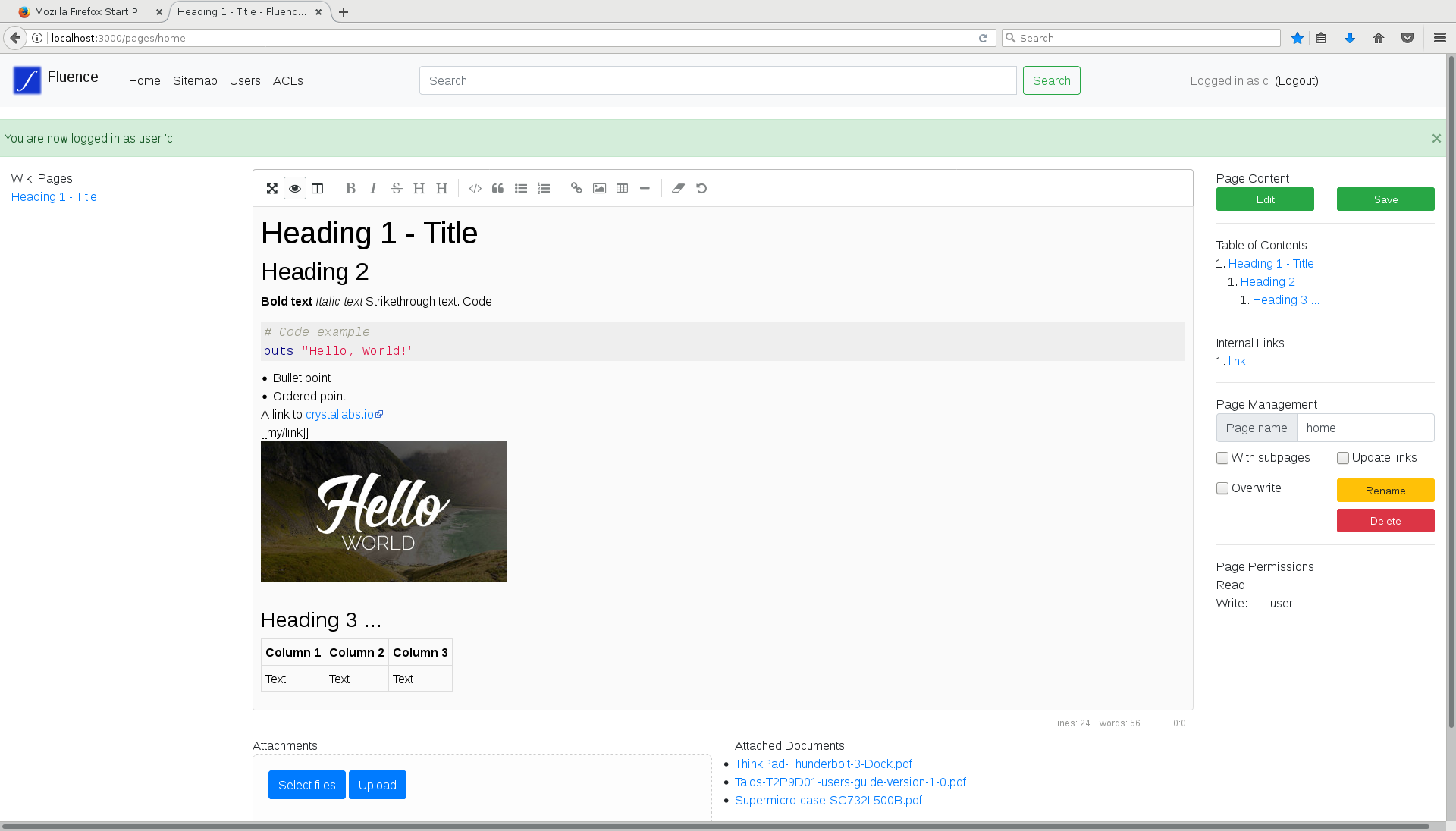
Here is how it currently looks:
When Fluence starts, by default it will create two subdirectories in the current directory:
data/for actual Wiki pages and their attached media files — a Git repository (bare by default; see storage modes above), with pages underpages/and attachments undermedia/in the repository treemeta/for metadata, which currently consists of filesusers,acl, andsecret(the auto-generated session-signing secret; sessions survive restarts because of it, and theWIKI_SECRETenvironment variable overrides it). When serving Fluence over HTTPS, also setFLUENCE_SECURE_COOKIES(to any value) so cookies are marked Secure.
There are no files or directories required to pre-exist for Fluence to work. The locations can be overridden with the environment variables FLUENCE_DATADIR and FLUENCE_METADIR.
Static assets (stylesheets, scripts, logo) are served from the public/ directory of the source tree Fluence was compiled from, so the binary can be started from any working directory. If that tree is not available at runtime, point FLUENCE_PUBLICDIR at a copy of public/.
There is no index or cache: listings, titles, internal-link resolution, and search always operate on the current repository contents, so nothing can go out of sync.
Page content is GitHub Flavored Markdown (tables, strikethrough, autolinks, emoji). Links between pages are ordinary markdown links — [Title](/pages/name), or a target relative to the current page such as [Title](sibling). To convert content written with the [[wikilink]] syntax to standard links, start Fluence once with FLUENCE_MIGRATE_WIKILINKS=1 — it rewrites all affected pages, commits them, and exits.
Every change made through the wiki is a git commit whose subject names the action and the entry: Create page docs/guide, Update page docs/guide, Rename page docs/guide -> docs/handbook, Delete page docs/guide, Upload media docs/guide/shot.png. The optional "Change summary" entered next to the Save button becomes the commit body, and automated follow-up edits (link rewrites after a rename, restores) describe themselves there too. Commits are authored by the acting wiki user and committed by "Fluence Wiki".
Each page links to its history (/pages/<name>?history): the list of commits that touched it, following renames. Every revision can be viewed as it was (?rev=<commit>) and its changes shown as a diff (?diff=<commit>); users with write permission on the page can restore any revision, which saves its content as a new commit. The history views live under the page's own URL, so the page's ACL applies to them.
Besides its name, every page can be reached through its title at /titles/<slug>, where the slug is the title (or the last component of the name) lowercased with runs of non-alphanumeric characters replaced by -. When several pages share a title, say alice/calendar, bob/calendar, and carol/calendar, the URL /titles/calendar shows them one after another, each under a link to the page itself; only pages the visitor may read are included. Fresh installs grant guests read access to /titles/*; on an existing installation add that ACL rule to open the view to anonymous visitors.
Logged-in users have a settings page (their name in the navigation bar, or /users/settings) with preferences that are stored in meta/users and apply from any browser: whether pages open in edit or view mode (or follow the site's open_*_in_edit options), whether the editor starts in side-by-side preview and/or fullscreen, the delay before the editor stores a draft in the browser (0 disables drafts), and the color scheme (light, dark, or the browser's preference).
Renaming a page moves its attachments (media/<name>/...) along with it in the same commit and rewrites the page's links to them; with "Update links" checked, links in other pages to the page and to its attachments are rewritten too.
Fluence serves the wiki repository over the git smart HTTP protocol at /repo, so no separate git hosting is needed:
git clone http://username@wiki.host:3000/repo
cd repo
# edit pages/*.md, add media/, commit...
git push
Authentication is HTTP Basic with the wiki username and password (git prompts for it, and credential helpers work as usual). Authorization uses the regular ACL, checked against the /repo URL: fetching/cloning requires Read, pushing requires Write. With the default ACLs of a fresh install this means any registered user can clone and pull, admins can also push, and anonymous users have no git access. To change that, add ACL rules on the path /repo/* — for example give the user group Write on /repo/* to let all registered users push, or the guest group Read on /repo/* to allow anonymous cloning.
Note that git access is all-or-nothing per operation: a clone contains the entire repository and its full history, and a push can modify any page or media file. Per-page ACL rules (such as a None rule hiding /pages/private/* from some group) are enforced by the wiki UI, but not within git transfers — grant Read/Write on /repo/* only to groups that may see and change everything.
Both storage modes accept pushes. In bare mode (the default), pushed commits are simply added to the repository. In working-tree mode, a push also updates the checkout (via git's receive.denyCurrentBranch=updateInstead); a push is refused while the checkout has uncommitted changes. Concurrent wiki edits are safe in both modes: wiki commits advance HEAD with compare-and-swap, so a simultaneous push and wiki edit cannot silently overwrite each other.
The Fluence Wiki is usable. On-disk format for data won't change so you will be able to upgrade in the future without trouble.
Important things to have in mind currently:
- On a fresh install, the first user to register becomes admin (member of the
admingroup, which can manage users and ACLs); everyone who registers later is a regular user who can read and edit pages and media but not administer the wiki. Registration is open by default and doesn't require any confirmation; setFLUENCE_REGISTRATION=closedto disable self-registration, after which only admins can add accounts through the admin interface. The permission scheme can be further configured via bothmeta/acland the GUI.
Things we have in mind or are working on are listed in project issues. Your comments will help us decide on priorities.